How to Create a Secure Password You Can Remember (2026 Guide)
Stop using pet names. Learn password entropy, build memorable passphrases, and why 15+ random characters beat complex 8-character passwords every time.
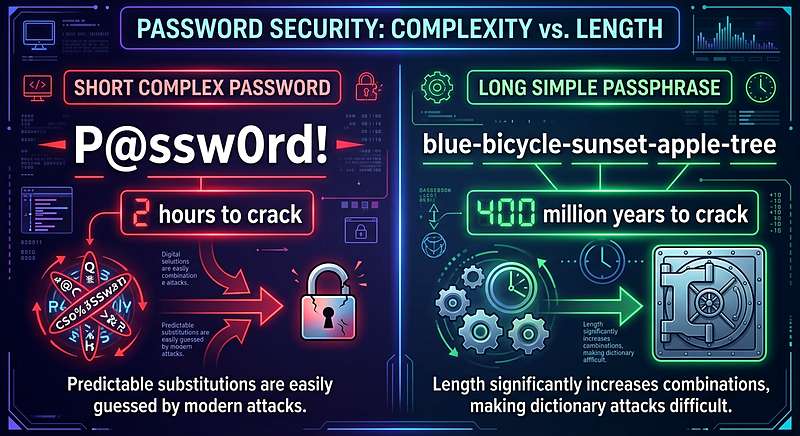
For the last 20 years, we have been told to create passwords with a mix of uppercase, lowercase, numbers, and symbols. Something like "P@ssw0rd123!".
This advice is outdated and actually makes us less secure. Because they are hard to remember, humans create predictable patterns (capitalize the first letter, add a "1" and a "!" at the end). Hackers know this, and their cracking software is built to try these exact patterns first.
Modern cybersecurity experts agree: **Length is the only thing that matters.**
The Math of Password Entropy
Password strength is measured in "entropy"—the mathematical measure of how unpredictable a password is, measured in bits. Every additional bit doubles the time it takes to crack.
A 10-character random string has about 60 bits of entropy. A 4-word passphrase (like "correct-horse-battery-staple") has about 50 to 60 bits. The difference is that a computer can guess the 10-character string much faster because the character set is limited. The dictionary of words is massive, making passphrases incredibly resilient to modern GPU cracking rigs.

The Power of Passphrases
A passphrase is simply a password made of multiple words. It is the best of both worlds: incredibly secure for the computer, but easy for a human to visualize and remember.
For example, instead of trying to remember `xT9#mQ!2`, you use `Tiger-Mango-Cedar-Velvet-Olive`. This is 30 characters long, making it incredibly difficult to brute-force, but your brain can memorize it in seconds because it conjures a vivid, weird image.
How to Generate the Perfect Passphrase
You should never pick the words yourself. Humans are terrible at randomness—we gravitate toward common words (like "love", "dog", "money") which hackers have in their dictionaries. You need a cryptographic random number generator.
- Open our Passphrase Generator.
- Choose how many words you want. We recommend 4 to 6 words.
- Choose a separator (hyphen, space, or period).
- Generate. The tool uses the Web Crypto API inside your browser to select truly random words from a list of 7,776 possibilities.
Create memorable, unbreakable passphrases instantly. 100% private.
Generate Secure PassphraseWhen to use Passwords vs. Passphrases
| Scenario | Use a Passphrase? | Why? |
|---|---|---|
| Your Master Password (Password Manager, Laptop Login) | Yes | You have to type it often. You need to memorize it without writing it down. |
| Netflix, Spotify, Social Media | No | Let a password manager generate a 15-character random string. You never have to type it. |
| Shared Accounts (Family Netflix) | Yes | It is much easier to tell your family "Tiger-Mango-Cedar" than "x7#G!2qP". |
Tools mentioned in this article
Frequently asked
Is a 4-word passphrase secure enough?
Yes, if the words are chosen randomly. A 4-word passphrase from a standard dictionary provides about 51 bits of entropy. This is strong enough to stop any online brute-force attack, and it would take a supercomputer years to crack the hash.
Should I write my password down on paper?
For your Master Password, writing it down once and keeping it in a locked safe or a locked drawer is safer than reusing the same password everywhere. However, never keep sticky notes on your monitor.
What is a good separator for a passphrase?
Hyphens (-) or spaces are best. Do not use a space if the website does not allow spaces in passwords. A hyphen is universally accepted.
Do I still need 2FA if I use a strong passphrase?
Yes. Even the strongest password can be stolen via phishing or malware. Two-Factor Authentication (2FA) is the ultimate safety net. Always enable 2FA on your email and banking accounts.